
Remember that thing where you’re researching something, click a link, then realize you’ve lost the context of your original search? Then you open a new tab, search again, click another link, and before you know it you’ve got seventeen tabs open and no idea which one had the answer you needed.
Google’s been trying to fix this for years, and their latest shot at it actually looks promising. AI Mode in Chrome, which launched earlier this year, just got two significant upgrades that make it feel less like a gimmick and more like something I’d actually use.
Side-by-side browsing without the side-eye
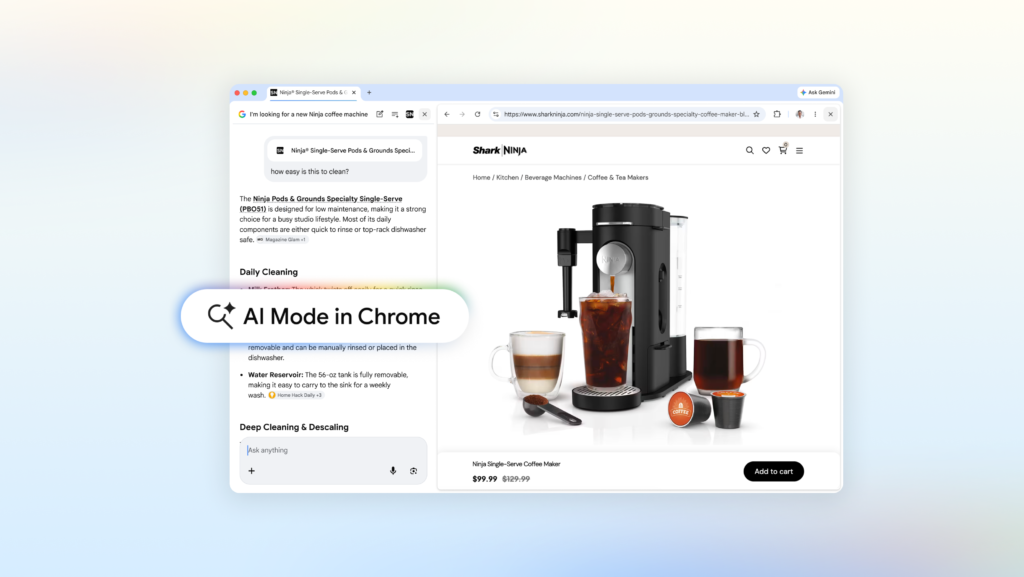
The big change is that clicking a link in AI Mode now opens the webpage alongside your search results instead of replacing them. On desktop, this means you get a split-view layout: the page on one side, AI Mode on the other. You can read the article, watch the video, or check the product page while still having your original query and AI-generated response visible.
This is one of those features that sounds obvious in hindsight but nobody quite nailed before. Google’s own examples make sense: you’re shopping for a compact coffee maker that also does lattes, AI Mode suggests a few models, you click one, and instead of losing your place you can ask “How easy is this to clean?” while the retailer’s page is still open. The AI uses context from both the page and the broader web to answer.
Same deal for research. Say you’re reading up on McLaren Racing teams and their pit crew training. You can open their official site alongside AI Mode, ask follow-up questions, and dig into each page without the constant tab-switching dance. Early testers apparently loved not having to juggle tabs for long articles or videos, which tracks with my own experience.
Searching across your open tabs
The second upgrade is more subtle but potentially more useful. You can now search across the Chrome tabs you already have open. On desktop or mobile, there’s a new “plus” menu in the search box on the New Tab page (or within AI Mode itself) that lets you select recent tabs and add them as context to your search. You can mix tabs with images or PDFs too.
Practical example: you’re researching hiking trails and have several sites open about local routes. Instead of manually cross-referencing them, you can add those tabs to your search and ask for similar kid-friendly trails in a different location. Or for the students out there, you can dump your class notes, lecture slides, and academic papers into AI Mode and ask for more examples to explain a tricky concept.
This is the kind of thing that sounds small but saves real time. I’ve lost count of how many times I’ve had to manually synthesize information across multiple tabs when the browser could just do it for me.
What’s actually different here
AI Mode isn’t new – Google’s been experimenting with AI-powered search for a while. What’s different is the integration depth. Earlier versions felt like a separate tool you had to consciously switch to. These updates make it feel more like a natural part of browsing.
The side-by-side view is the biggest win. Other browsers have tried split views before, but tying it directly to search context makes it actually useful. And searching across open tabs is something that should have existed years ago.
That said, there are limits. AI Mode still makes mistakes – it’s generative AI, so hallucinations happen. The side-by-side view only works on desktop for now, and the tab search feature requires you to manually select which tabs to include. It’s not magic, it’s just good engineering.
Should you care?
If you’re the type of person who regularly has 15+ tabs open and feels vaguely anxious about it, yes. If you do research-heavy browsing for work or school, absolutely. If you mostly check the same three sites every day, probably not.
Google’s betting that the convenience of not switching tabs outweighs the friction of learning a new interface. Based on the early tester feedback they’re citing, that bet might pay off. I’m cautiously optimistic – this feels like one of those AI features that actually solves a real problem instead of creating new ones.
Comments (0)
Login Log in to comment.
Be the first to comment!