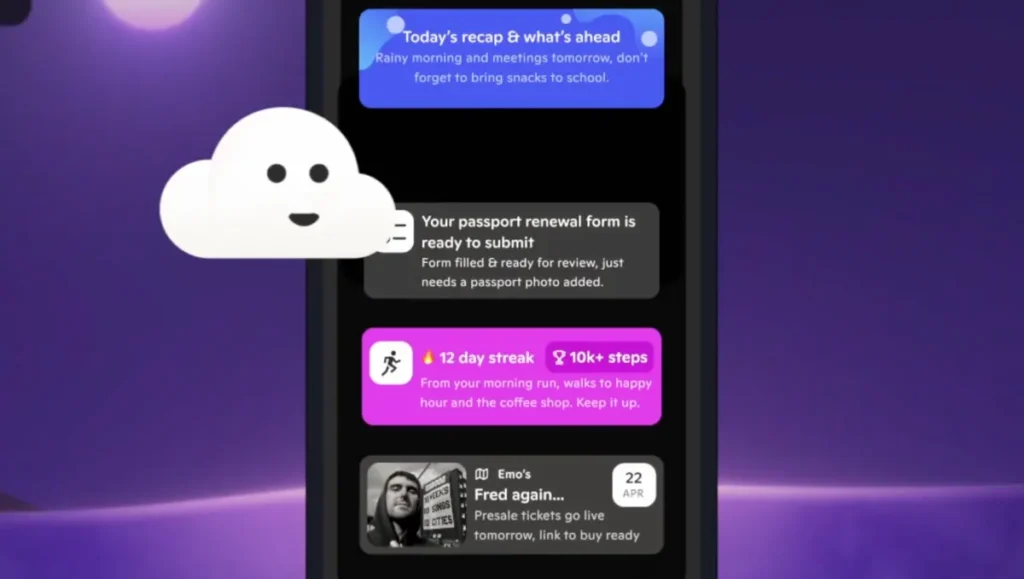

Here’s a sentence I didn’t expect to write in 2026: an iPhone app that replaces your home screen with an AI agent just raised money before anyone outside a closed beta has touched it.
That app is called Skye. It’s not another widget wrapper or a glorified shortcut launcher. The pitch is that Skye learns your habits, your schedule, your communication patterns, and then surfaces what you actually need — not a grid of icons you arranged six months ago and never touched again.
Investors bought in. The round hasn’t been disclosed publicly, but the fact that it closed before a public launch tells you something about the appetite right now for AI that sits at the OS level. Not a chatbot you open when you’re bored. Something that lives on your home screen and decides what you see.
I’ve been using a beta for a few days. The first thing you notice is how quiet it is. No flashy animations, no “AI is thinking” spinner. It just… adjusts. If I usually check email first thing, my home screen shows my inbox at 7 AM. By noon, it’s showing my calendar and the Slack channels I’ve been active in. By evening, it’s showing my podcast app and a reminder to walk the dog.
That sounds simple, but the execution is where most of these attempts fail. Remember the “proactive” assistants from a few years ago? Siri suggestions that showed apps you opened once in 2019? Skye’s different because it’s not just recency-based. It’s modeling actual patterns — time of day, day of week, app usage sequences, even location context — and surfacing what you’re likely to need next, not what you last touched.
The privacy question came up immediately. An app that watches everything you do on your phone is a hard sell. Skye’s answer is that all processing happens on-device. No cloud, no telemetry back to a server. That’s the only way this works, frankly. If it were phoning home, I’d uninstall it before lunch.
Is it perfect? No. It still struggles with edge cases — I travel for work irregularly, and it took three days to figure out that my “travel” pattern isn’t the same as my “office” pattern. And there’s a learning curve: you have to trust it, which means letting it rearrange your home screen, which is unsettling at first.
But the funding before launch makes sense. The home screen is the last untouched real estate on the iPhone. Apple’s own efforts here have been half-hearted at best. Skye is betting that users are ready to hand over control if the trade-off is genuinely useful, not just more notifications.
I’m not ready to call it the future of phone interfaces. But it’s the first time in years I’ve felt like my phone might actually get smarter instead of just faster.
Comments (0)
Login Log in to comment.
Be the first to comment!